QOLORBEAM
Free Demo
BIM Take-off Platform

Turn BIM models into structured, interactive quantity data

Connect your Autodesk ACC account, upload a Revit or IFC model, and get a structured quantity table instantly. When the model changes — see exactly what changed.

14-day free trial · No setup fees · Autodesk SSO

app.qolorbeam.com
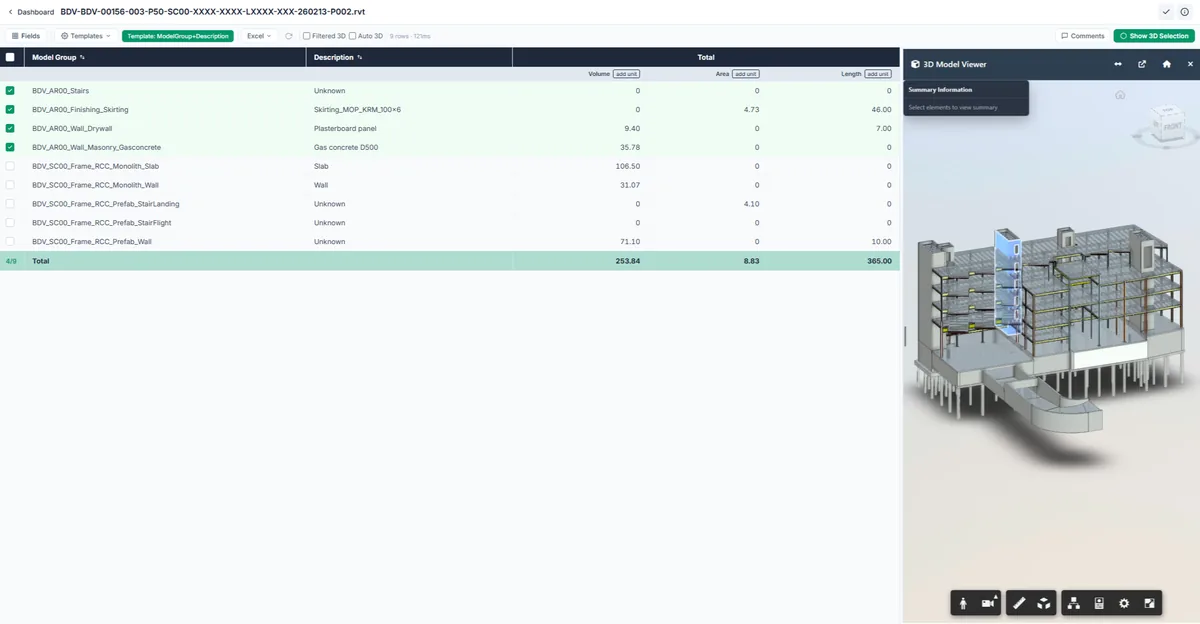
QOLORBEAM — structured quantity table with 3D model viewer

From BIM model to quantity data in three steps

No manual schedules. No Excel copy-paste. No re-work when the model updates.

01

Connect your ACC account

Sign in with your Autodesk credentials. QOLORBEAM connects directly to Autodesk Construction Cloud — your models, your access controls.

02

Get structured quantities instantly

Upload a Revit .rvt or IFC file. QOLORBEAM extracts all element data and builds a structured, filterable quantity table — ready in minutes.

03

Track changes across versions

Upload the next model version and see a precise diff: what was added, removed, or changed — at element level. No manual comparison, no missed items.

Quantity Take-off

Every element. Every parameter. Structured and ready to use.

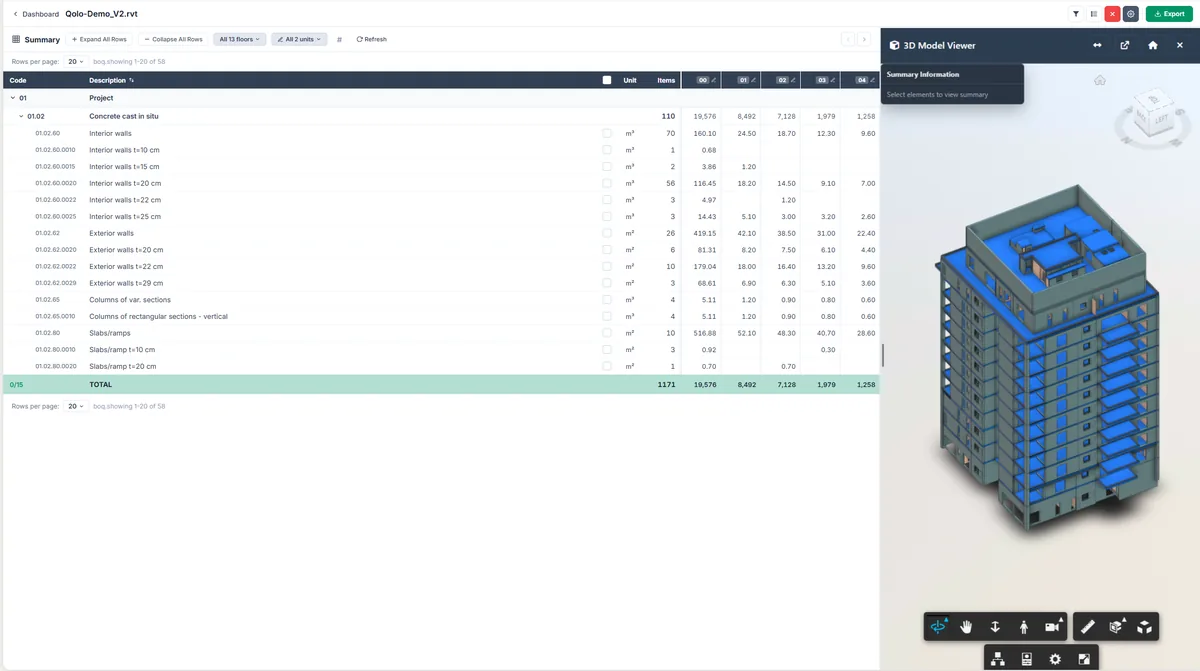
QOLORBEAM reads your Revit or IFC model and organises all element data into a structured table. Filter by category, discipline, or custom parameter. Switch between a flat list and a pivot view in one click.

  • Flat list and pivot table views
  • Filter and group by any BIM parameter
  • Excel export with formatting preserved
  • Comments on any row — keep context in one place
  • Report templates for recurring take-off types
Linear QTO view — element quantities with 3D model highlight
Gate-Demo_V2.rvt → V3.rvt
+12 added −3 removed ~8 modified
Description Unit V2 V3 Δ
Exterior walls t=25 cm 1,245.30 1,245.30
Columns Ø40 cm pcs 52 +52
Interior walls t=10 cm 211.40 removed
Slabs t=20 cm 892.10 967.80 +75.70
Stairs (concrete) 34.20 34.20
Our signature feature

New model version? See exactly what changed.

Upload any new version of your model and QOLORBEAM compares it against the previous one automatically. Get a precise diff of quantities: what was added, removed, or modified — at element level, not just totals.

No more manual cross-referencing. No more missed changes in budget-critical items.

  • Element-level diff, not just summary totals
  • Colour-coded: added · removed · modified
  • Filter to show only changed items
  • 50 model slots — swap versions without losing your slot
AI Capabilities

Ask your model a question. Get a structured answer.

QOLORBEAM's AI layer works directly with your quantity data. Auto-categorise elements, detect anomalies in your take-off, and get natural language summaries of what changed between versions.

  • Auto-categorisation of uncategorised elements
  • Anomaly detection: flag items that look out of range
  • Natural language summaries of version diffs
  • AI-assisted scope of work generation coming soon
AI Assistant — Gate-Demo_V3.rvt
U
What's the total concrete volume?
Q
Total concrete volume is 3,471.2 m³
· Slabs: 967.8 m³ · Columns: 312.4 m³ · Walls: 2,191.0 m³
847 elements · 3 categories
U
Summarise what changed vs V2
Q
V3 adds 52 columns and expands slab area by +75.7 m². Interior partition walls (211 m²) were removed. Net concrete change: +340.4 m³.
Autodesk Integration

Works with the tools your team already uses

Connect directly to Autodesk Construction Cloud. Sign in with your existing Autodesk account — no new user management, no data migration. Your models stay in ACC; QOLORBEAM just reads what it needs.

Autodesk SSO

One login for everything. Your ACC or Revit credentials work in QOLORBEAM directly.

Direct ACC connection

Models live in ACC. QOLORBEAM reads them — nothing to re-upload or re-sync manually.

Revit + IFC support

.rvt files via ACC · IFC 2x3, IFC 4, IFC 4.3 — all major versions supported.

QOLORBEAM is an independent product and is not affiliated with or endorsed by Autodesk, Inc.
Simple, transparent pricing

Start with one seat. Grow to a full team. No hidden fees.

Welcome
€110 /month
or €88/mo billed annually
  • 1 user
  • 50 model slots
  • All core features included
Start free trial
Most popular
Team
from €279 /month
or from €223/mo billed annually
  • 3–10 users
  • 50 model slots
  • Everything in Welcome
  • Team roles & management
  • +€70 per additional user
Start free trial
See full pricing and feature comparison

Frequently asked questions

Which file types does QOLORBEAM support?

Revit files (.rvt) via Autodesk Construction Cloud, and IFC files (IFC 2x3, IFC 4, IFC 4.3) uploaded directly. We don't currently support DWG, Navisworks, or point clouds.

Do I need an Autodesk account?

Yes. QOLORBEAM uses Autodesk SSO — your ACC or Revit account is the only way to sign in. This keeps your model data inside the Autodesk ecosystem and means no separate credentials to manage.

What is a model slot?

A model slot is a space for one BIM file in your workspace. You can swap between versions of the same model without losing the slot. All plans include 50 model slots.

How does version comparison work?

Upload a new version of your model and QOLORBEAM automatically compares it against the previous one. You get a colour-coded diff at element level — added, removed, and modified items — filterable and exportable to Excel.

How does the free trial work?

You get 14 days of full access to all features. A payment method is required to start — you won't be charged until the trial ends, and you can cancel any time before then.

How is QOLORBEAM different from Autodesk Takeoff?

Autodesk Takeoff is a separate Autodesk product often bundled in enterprise plans. QOLORBEAM is more affordable, adds model version comparison and AI capabilities that Autodesk Takeoff doesn't have, and works with IFC files — not just Revit.

Ready to stop extracting quantities manually?

Connect your ACC account and get your first quantity table in minutes.

14-day free trial · No setup · Cancel anytime